| Total Video Converter > Total Video Editor for Mac and Win |
Total Video Editor
Powerful Video Editing App for Mac and Win
Video editing is a difficult task that requires relatively powerful computer and capable applications.
But there is a few professional and easy to use Video Editor for Mac that specially designed for Mac users in today’s market. High definition video quality is becoming more common, even the most casual videographer will want to upload and share enjoyable video-viewing experience with acceptable resolutions in the increasingly faster Internet connectivity. Sometimes the typical flashiness-free footage will do, but many people need to improve or elevate a simple footage into something more entertaining, fun, audience-engaging, and unique. The process may involve a lot of things, and therefore you need reliable video editor for Mac and Windows that does everything fast and well.
All video editors for Mac OS X and Windows are marketed as such; some do not come cheap, so you must choose carefully to avoid waste of money. Purchasing professional-grade video editor for Mac OS and Windows will help you handle most editing tasks with ease, but smart buyers will not want to buy feature they rarely use, and this is Total Video Editor for Mac comes in.
For more casual users, not professional videographers who created animated movies or explainer videos, one of the most important features of video editor for Mac and Windows is simple and intuitive user interface. Regardless of how advanced the app is, cluttered interface makes it difficult to navigate between processes and therefore brings unnecessary learning curve. Total Video Editor for Mac is an exception for its straightforward usefulness without any distracting unimportant cosmetic details, making any video editing process an enjoyable task for home users. Created by the same company that brought us the popular Total Video Converter, the application remains easy to use yet it delivers most-wanted features including:
- Trimming: the ability to cut a single footage into multiple segments and trim the unwanted parts from the video. It gives you clean footage to convey only the information you need to deliver.
- Enhancement: various features to enhance video quality such as contrast, brightness, volume, and frame rotations. You can also do everything at the same time using the Magic Enhance feature.
- Texts: adding texts and titles is no longer a difficult process. Total Video Editor for Mac offers preset text animations as well.
- Overlays & Filters: an overall enhancement process to give effects to video using filters and overlays.
- Music: adding music or songs to a footage to create better atmosphere.
- Elements: adding still and motion graphics to the video for more exciting effects.
- Slideshow: create photo slideshow from numerous pictures.
Finally, Total Video Editor for Mac supports all popular video formats including FLV, AVCHD, 3GPP, MPEG-4, MPEG, WMV, QuickTime, and more as well as virtually any audio file including AAC, FLAC, WMA, MP3, AMR, etc.
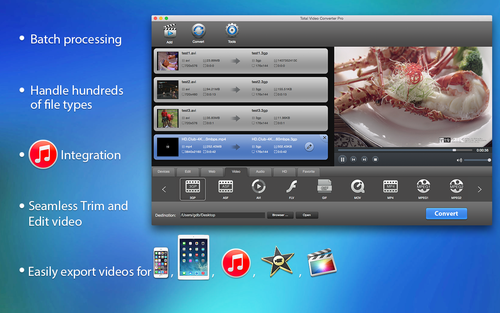
Seperate Audio from Video with Total Video Converter?
Total Video Converter is a powerful video editor which seperate audio from video quickly . The video editor also supports other popular video and audio formats including mp4, psp, mpeg, 3gp, flv, mov, asf, wav, wmv, mp3, aac, mmf etc. Meanwhile, it supports for converting and burning video to HD formats like H.264 TS, Mpeg-2 TS, WMV-HD, MKV-HD, DivX-HD, Divx-HD, MOV-HD, FLV-HD and MP4-HD.
1. Launch E.M. Total Video Converter Video Editor.
Method 1:
1. Choose the source file in the Task List.
2. Click the button"settings".
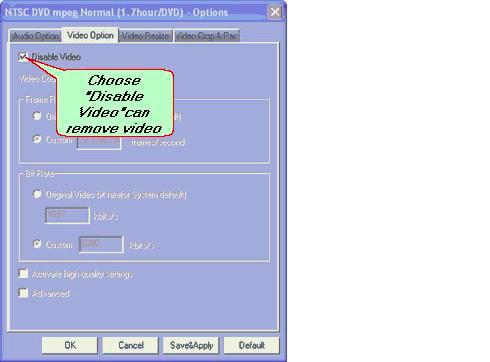
3. Enter into the Video Option interface,choose "Disable Video"(sign in the frame).eg:
4. Click "convert now" and convert video file to audio.
Method 2:
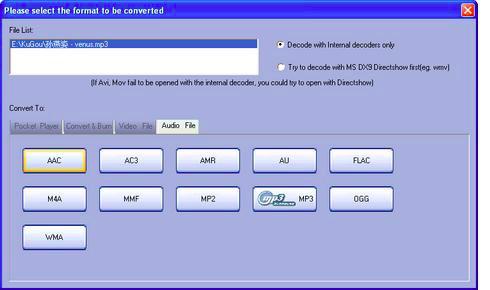
You can choose the audio when choose the converted output formats,eg:
Get more information at: E.M. Total Video Converter.
Download Buy now
Total Video Converter supports reading the following file formats:
Convert Any Video Formats:
Convert video from Real Video Rmvb (.rm,.rmvb)
Convert video from MPEG4 (.mp4)
Convert video from 3gp (.3gp, 3g2)
Convert video from Game Psp (.psp)
Convert video from MPEG1 (.mpg, mpeg)
Convert video from MPEG2 PS (.mpg, mpeg, vob)
Convert video from MPEG2 TS (DVB Transport Stream)
Convert video from DIVX (.divx)
Convert video from Ms ASF (.asf, .wmv)
Convert video from Ms ASF (.asf, .wmv)
Convert video from Ms AVI (.avi)
Convert video from Macromedia Flash video FLV (.flv)
Convert video from Apple Quicktime (.mov)
Convert video from FLIC format (.fli, .flc)
Convert video from Gif Animation (.gif)
Convert video from DV (.dv)
Convert video from Matroska (.mkv)
Convert video from ogm (.ogm)
Convert video from Video Formats Dx9 Directshow can open
Convert Any Audio Formats:
Convert audio from CD audio (.cda)
Convert audio from MPEG audio (mp3, mp2)
Convert audio from Ms WAV (.wav)
Convert audio from Ms WMA (.wma)
Convert audio from Real Audio (.ra)
Convert audio from OGG (.ogg)
Convert audio from Amr audio (.amr)
Convert audio from AC3 (.ac3)
Convert audio from SUN AU format (.au)
Convert audio from Macromedia Flash embedded audio (.swf)
Convert audio from Audio Formats Dx9 Directshow can open
Total Video Converter supports generating the following file formats:
Total Video Formats Converter:
Convert to MPEG4(.mp4) video
Convert to 3gp(.3gp, 3g2) video
Convert to Game Psp (.psp) video
Convert to MPEG1 (.mpg, mpeg) video
Convert to NTSC, PAL DVD mpeg and Burn video to DVD disc
Convert to NTSC, PAL SVCD mpeg and Burn video to SVCD disc
Convert to NTSC, PAL VCD mpeg and Burn video to VCD disc
Convert to Ms Mpeg4 AVI (.avi) video
Convert to Divx AVI (.avi) video
Convert to Xvid AVI (.avi) video
Convert to H264 AVI (.avi) video
Convert to Mjpeg AVI (.avi) video
Convert to HuffYUV AVI (.avi) video
Convert to Swf Video (.swf) video
Convert to Flv Video (.flv) video
Convert to Gif Animation (.gif) video
Convert to Mpeg4 Mov (.mov) video
Convert to Apple Quicktime (.mov) video
Convert to DV (.dv) video
Convert to WMV (.wmv) video
Convert to HD Mpeg TS (.ts) video
Convert to ASF (.asf) video
Total Audio Formats Converter:
Convert to MPEG audio(mp3, mp2) audio
Convert to Ms WAV (.wav) audio
Convert to Ms WMA (.wma) audio
Convert to OGG (.ogg) audio
Convert to Amr audio (.amr) audio
Convert to AC3 (.ac3 audio )
Convert to SUN AU format (.au) audio
Convert to m4a (mp4 audio) audio
Convert to aac (aac audio) audio
Convert to mmf (mmf audio) audio
Convert to Flac (flac audio) audio
Get more information at: Total Video Converter.
Download Buy now
|