How to burn video to DVD
Step by step guide to burn video to DVD
Total Video Converter is a powerful DVD burner which burn video to DVD with high quality. The DVD burner also converts other popular video and audio formats including mp4, psp, mpeg, 3gp, flv, mov, asf, wav, wmv, mp3, aac, mmf etc. Meanwhile, it supports for converting and burning video to HD formats like H.264 TS, Mpeg-2 TS, WMV-HD, MKV-HD, DivX-HD, Divx-HD, MOV-HD, FLV-HD and MP4-HD.
1.Download free trial Version here: Total Video Converter Or Total Video Converter for Mac. Then install and lauch this program. Restart the computer and open the DVD Burner program.
2.Click new task, then you can see the Total DVD Burner interface.
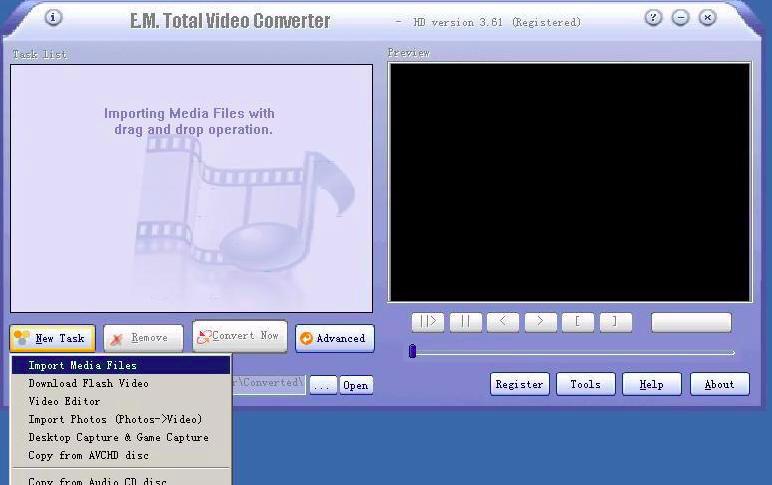
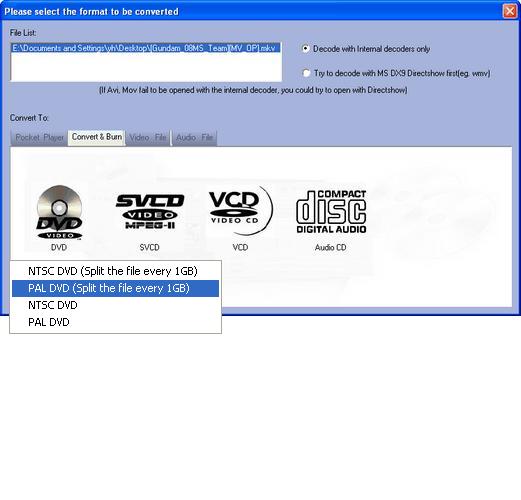
Choosing the button “convert & burn” you will see the following window. Select the button which pops up . Choose the suitable format DVD. You start the Media Burner.
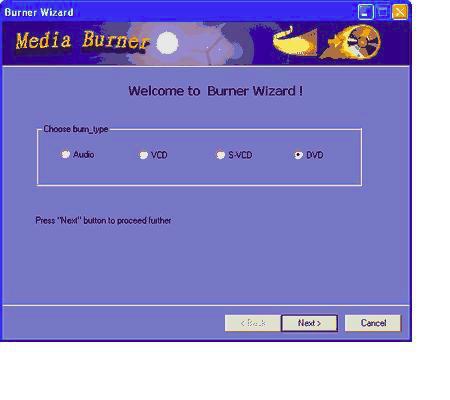
3. Choose one of the burn types that include Audio , VCD , S-VCD , DVD in the below dialog:
4.Click the “Next” button and the system will Look up the chosen burning equipment.
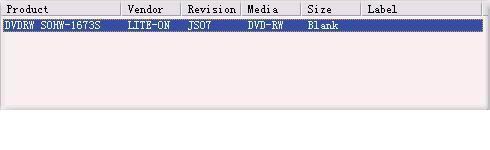
If you want to burn CD,VCD,SVCD, a CD is necessary;
If you want to burn DVD,you need a DVD.
If your CD is erasable ,you can click “Erase” button to erase the CD.
5. Add dvd burning files
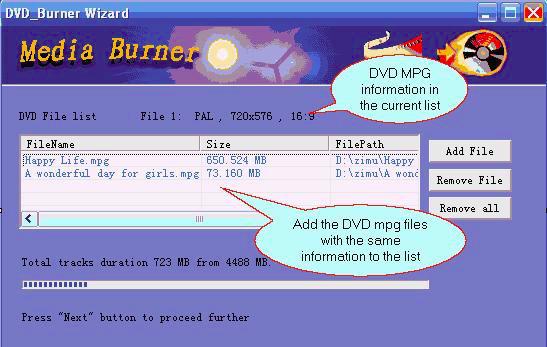
(1) To burn DVD,it is important that the information(video format,video size,aspect)of each DVD mpg file must be the same,or it can’t be added.
For example,if you choose PAL, 720*576,16:9,you can’t add the files like NTSC, 720*480,16:9.The information of the files to be added will be displayed in the list box that you can see in the following dialog.
(2) When you burn VCD and SVCD,only one file could be chosen;
(3) To burn Audio file,the supported audio formats include MP3,WMA,WMV,OGG,etc.
6. DVD AUthor (It is necessary only for burning DVD )
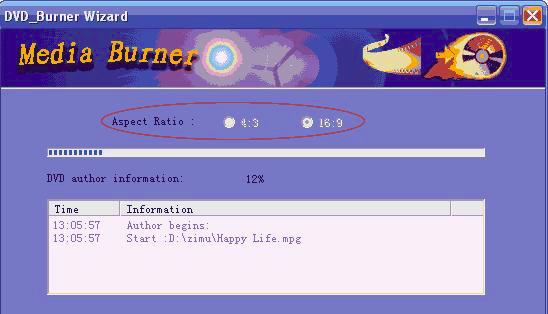
DVD AUthor is to pack mpg files up to generate .vob .ifo .bup files.
AUthor begins when you click “next”,you can adjust Aspect to 16:9 or 4:3 according to your request before you click “next”.
7. Video Burner settings
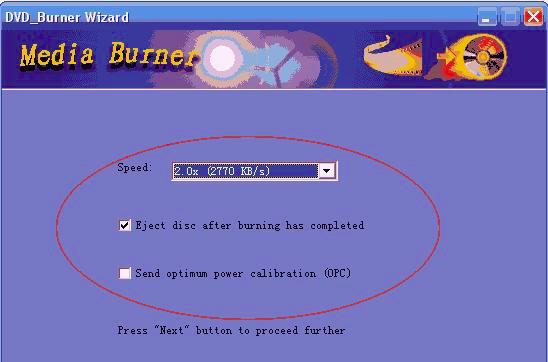
You can set the burning speed and select the check box whether pop up CD and send to OPC automatically or not after finishing burning.
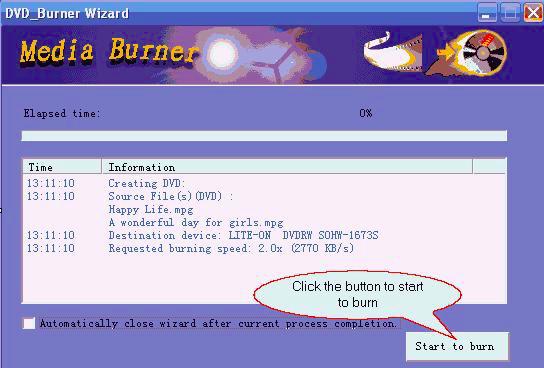
8. Please click “start to burn” to begin burning.
Before burning Audio VCD SVCD, you can click “test” to test.
Download Video DVD Burner| Buy DVD Burner
Key functions
* Convert and burn all general and HD videos to MPEG2 TS HD which can work on PS3, Xbox, Apple TV, iPod, iPhone, and a wide range of portable multi-media devices! Besides, You can also convert all general and HD videos to standard videos.
* Combine several video and audio files to one video file;Extract audio from various of videos and convert which to all kinds of audios like mp3, ac3, ogg,wav,aac);Demultiplex or extract video and audio; Multiplex video and audio to one file
* Auto detects your CPU and supports multi-core CPU providing you with the highest conversion speeds; Advanced profile settings are available for you to define the output parameters.
* Easily capture games to video files that supporting various video formats and download flash videos (winXP) from video-sharing website.
Total Video Converter supports reading the following file formats:
Convert Any Video Formats:
Convert video from Real Video Rmvb (.rm,.rmvb)
Convert video from MPEG4 (.mp4)
Convert video from 3gp (.3gp, 3g2)
Convert video from Game Psp (.psp)
Convert video from MPEG1 (.mpg, mpeg)
Convert video from MPEG2 PS (.mpg, mpeg, vob)
Convert video from MPEG2 TS (DVB Transport Stream)
Convert video from DIVX (.divx)
Convert video from Ms ASF (.asf, .wmv)
Convert video from Ms ASF (.asf, .wmv)
Convert video from Ms AVI (.avi)
Convert video from Macromedia Flash video FLV (.flv)
Convert video from Apple Quicktime (.mov)
Convert video from FLIC format (.fli, .flc) br>
Convert video from Gif Animation (.gif)
Convert video from DV (.dv)
Convert video from Matroska (.mkv)
Convert video from ogm (.ogm)
Convert video from Video Formats Dx9 Directshow can open
Convert Any Audio Formats:
Convert audio from CD audio (.cda)
Convert audio from MPEG audio (mp3, mp2)
Convert audio from Ms WAV (.wav)
Convert audio from Ms WMA (.wma)
Convert audio from Real Audio (.ra)
Convert audio from OGG (.ogg)
Convert audio from Amr audio (.amr) br>
Convert audio from AC3 (.ac3)
Convert audio from SUN AU format (.au)
Convert audio from Macromedia Flash embedded audio (.swf)
Convert audio from Audio Formats Dx9 Directshow can open
Total Video Converter supports generating the following file formats:
Total Video Formats Converter:
Convert to MPEG4(.mp4) video
Convert to 3gp(.3gp, 3g2) video
Convert to Game Psp (.psp) video
Convert to MPEG1 (.mpg, mpeg) video
Convert to NTSC, PAL DVD mpeg and Burn video to DVD disc
Convert to NTSC, PAL SVCD mpeg and Burn video to SVCD disc
Convert to NTSC, PAL VCD mpeg and Burn video to VCD disc
Convert to Ms Mpeg4 AVI (.avi) video
Convert to Divx AVI (.avi) video
Convert to Xvid AVI (.avi) video
Convert to H264 AVI (.avi) video
Convert to Mjpeg AVI (.avi) video
Convert to HuffYUV AVI (.avi) video
Convert to Swf Video (.swf) video
Convert to Flv Video (.flv) video
Convert to Gif Animation (.gif) video
Convert to Mpeg4 Mov (.mov) video
Convert to Apple Quicktime (.mov) video
Convert to DV (.dv) video
Convert to WMV (.wmv) video
Convert to HD Mpeg TS (.ts) video
Convert to ASF (.asf) video
Total Audio Formats Converter:
Convert to MPEG audio(mp3, mp2) audio
Convert to Ms WAV (.wav) audio
Convert to Ms WMA (.wma) audio
Convert to OGG (.ogg) audio
Convert to Amr audio (.amr) audio
Convert to AC3 (.ac3 audio )
Convert to SUN AU format (.au) audio
Convert to m4a (mp4 audio) audio
Convert to aac (aac audio) audio
Convert to mmf (mmf audio) audio
Convert to Flac (flac audio) audio
Download DVD Burner| Buy DVD Burner
|