Free · No sign-up · No watermark
YouTube Thumbnail Maker — 1280x720, Online and Free
A thumbnail is the only frame of your video most people will ever see, and it is doing that job at the size of a postage stamp in a crowded sidebar. That changes the design brief: the title has to read at 210 pixels wide, the subject has to be recognisable before the file finishes loading, and the file has to arrive at 1280 by 720 without being cut by the player. This page does those three things in a browser tab — crop to 16:9, resize to the exact pixel count, type a title with a solid colour block behind it, and save a JPG. Nothing is uploaded, and no watermark is stamped on the result.
- 16:9 crop preset
- Exact 1280 by 720 export
- Text, shapes and arrows
- No account, no watermark
How to make a YouTube thumbnail online
Four steps, about five minutes. The layout decision takes longer than the clicking.
-
Start from the best frame you already have
Click Open and load a still from the video, a screenshot, or a photo of the person who is talking. A frame with a face and one clear object beats a wide shot of a room, because at thumbnail size only one shape will register.
-
Crop to 16:9
Choose Crop and pick the 16:9 preset so the frame matches the player exactly. Drag the box rather than a corner to decide what stays: put the face on one side and leave the other side empty for the title, which is easier than fighting the photo for space.
-
Resize to 1280 by 720
Switch to Resize and type 1280 into the width with the ratio locked; the height falls to 720. Do not take a 200 pixel crop and blow it up to 1280 — the result looks like a mosaic. If the source is smaller than 1280 wide, a slightly softer thumbnail is still better than an invented one.
-
Add the title, then export a JPG
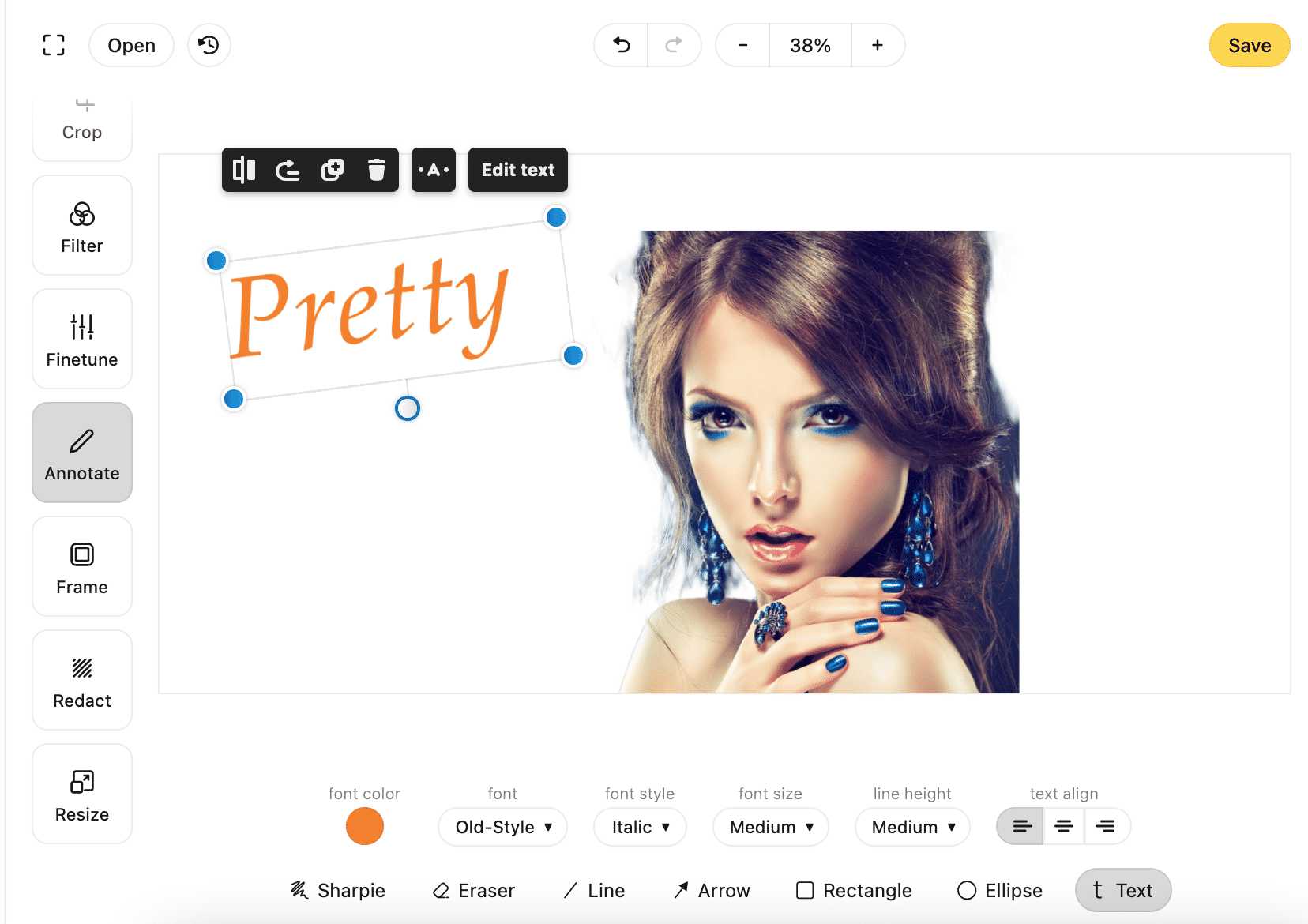
Pick Annotate, choose text, and type four words at most in a heavy weight. Give the letters a dark or white background colour block so they stay legible over a busy photo. Press Save, choose JPEG, and check the file stays under 2 MB.
Three layout rules that decide whether the thumbnail gets clicked
None of them are about taste. They are about what survives being shown at a fifth of the size you are designing at.
Four words is a long title
You are reading this on a monitor, where the thumbnail is roughly 360 pixels wide. In a recommendation sidebar it is nearer 210, and on a phone it is smaller still. A sentence becomes grey mush at that size; four heavy words still read.
A block is not a stroke
Contrast is what makes letters survive a photo, and this editor gives you two ways to get it: a text colour that fights the background, or a solid background colour behind the block. It does not draw an outline around the letters — if a stroke or a drop shadow is the look you want, that is a layer effect in PixelStyle, described below.
One focal point, and keep off the corner
A face, a product and an arrow all competing means the eye lands nowhere. Choose one subject, then use a single rectangle, circle or arrow to point at it. Leave the bottom-right corner clear: YouTube stamps the video duration there, and a title placed under it disappears.
The file is a spec, not a preference
1280 by 720 pixels, 16:9, under 2 MB, in JPG, PNG, GIF or BMP. Miss any of those and YouTube either rejects the upload or letterboxes your image, which is how a carefully composed thumbnail ends up with black bars down the sides.
Four kinds of video where the thumbnail carries the channel
Different genres, same constraint: one image has to explain the promise of the video before anyone reads the title.
- Tutorials and how-to videosShow the end result, not the process. A finished cake, a working spreadsheet, the repaired hinge — plus three or four words naming the outcome. Screenshots work too, cropped to the one panel that matters.
- Gaming and commentaryThe frame needs a readable face or character and a strong colour field. Full-bleed game footage with a corner face cam and a short shouted phrase is the pattern for a reason: it reads at any size.
- Reviews and unboxingsThe product fills the frame, angled, with a plain background behind it. This is where a browser crop earns its keep, since retail photos and press images usually arrive on white at an awkward ratio.
- Podcast and interview clipsTwo faces, split down the middle, with the guest named on one side. Keep both heads at the same height, and put the name in the empty half rather than across a chin.
When the title needs an outline
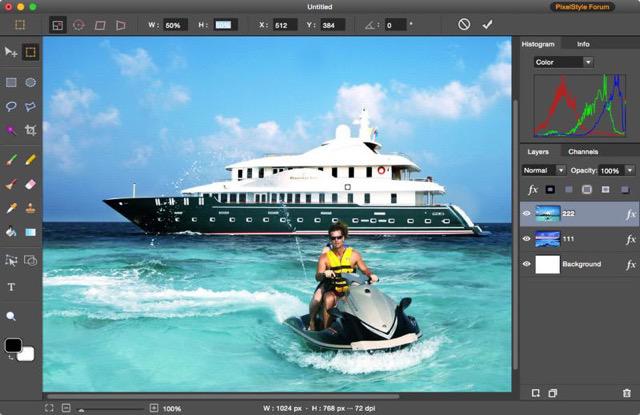
PixelStyle sets thumbnails in layers, with real strokes
The browser tool is honest about its limit: text gets a colour and a block behind it, not an outline. On a Mac, PixelStyle Photo Editor gives text its own layer and then adds layer effects — a stroke around the letters, an outer glow, a drop shadow — which is the difference between a title that sits on the photo and one that floats above it. The same window handles the rest of a thumbnail: AI Background Remover lifts the presenter off a cluttered room and drops them onto a flat colour, AI Auto Segmentation pulls an object out of a product shot in one click, and the canvas is set to 1280 by 720 so the export arrives at the exact size the player expects.
- Stroke, outer glow and shadow as text layer effects
- AI Background Remover puts the subject on a flat colour
- Layers for text, cutout, photo and shapes, each editable
- Exports JPG, PNG, TIFF and WebP at 1280 by 720
Requires macOS · 7-day free trial · or download on the Mac App Store
Thumbnail questions worth answering before you upload
Sizes, text, and the one effect this page cannot produce.
What size should a YouTube thumbnail be?
1280 by 720 pixels, in a 16:9 ratio, under 2 MB. YouTube accepts JPG, PNG, GIF and BMP, and it recommends a minimum width of 640 pixels. Uploading a square image gets you black bars on both sides, because the player does not crop the way a feed does.
Can I add an outline or drop shadow to the title here?
No. The text tool gives you a font, a size, bold or italic, alignment, line height, a text colour and a background colour for the block. An outline around each letter is a layer effect, and this editor has no layers. PixelStyle Photo Editor applies strokes, glows and shadows to a text layer on the Mac.
How much text should a thumbnail carry?
Three or four words. The thumbnail is shown at roughly 210 pixels wide in a sidebar, so a word set at 60 pixels on your 1280 pixel canvas arrives as about ten pixels on screen. Anything under about 90 pixels tall on the canvas is decoration, not information.
Does YouTube crop the thumbnail?
The player shows the whole 16:9 image, so nothing is cut. What does get covered is the bottom-right corner, where the duration badge sits, and the centre, where the play button appears on hover in some layouts. Compose with both areas clear.
Why does my thumbnail look blurry after uploading?
Two causes. The crop held only a few hundred pixels and was scaled up to 1280, or the photo was already soft from a phone's digital zoom. Cropping and resizing cannot add detail, so start from the largest version of the frame you can get.
Is the image uploaded while I work on it?
No. The editor runs in the tab and edits a copy held by the browser canvas. The download lands in your folder and you upload it to YouTube yourself, so the file only reaches the service you choose.