Free · Draw in the browser · Nothing uploaded
Add an Arrow to an Image Online — Free, No Install
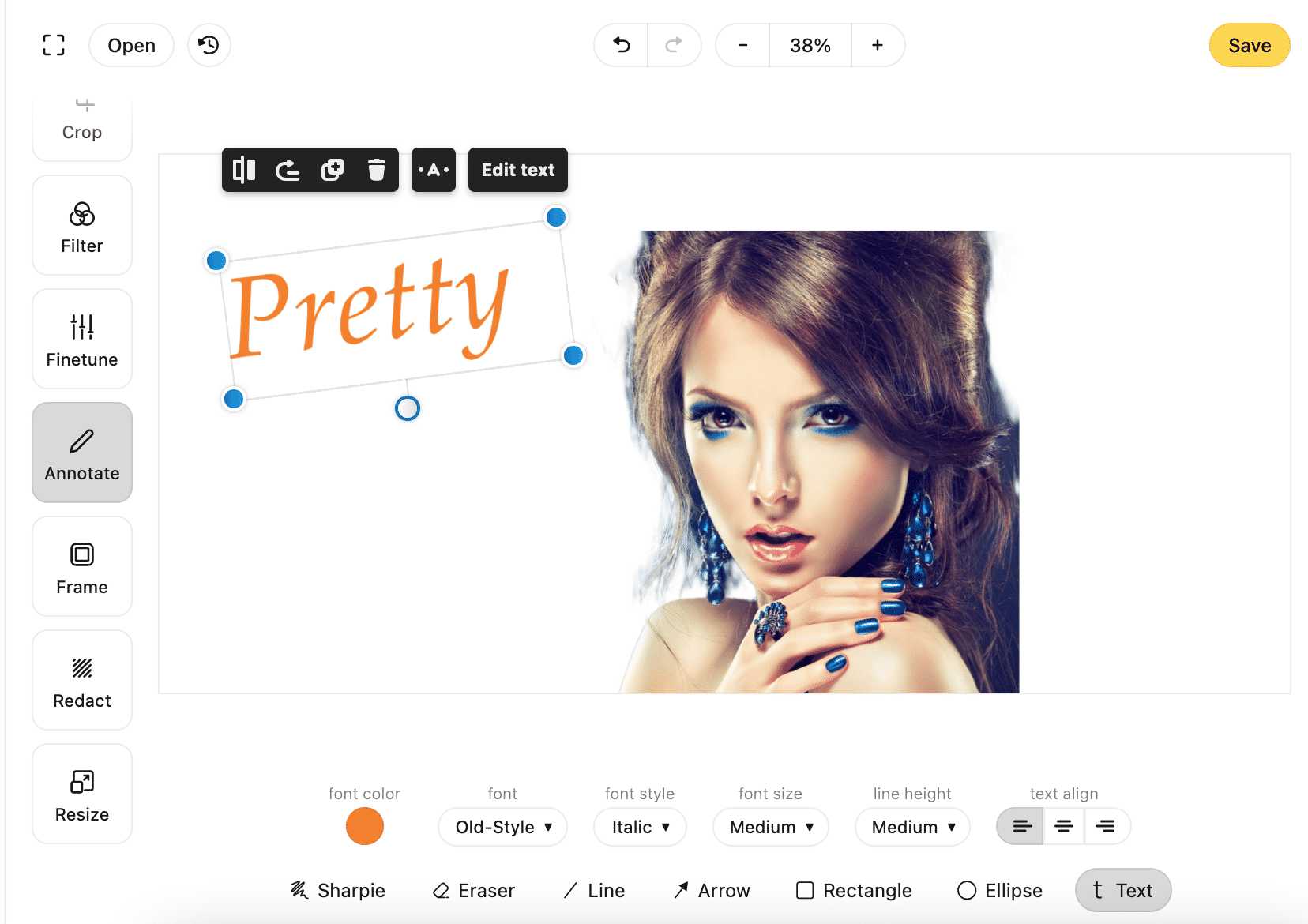
Words describe a picture badly when the thing you mean is one square inch of it. An arrow fixes that in one drag: it says here, this corner, this scratch, this screw. The free editor in your browser gives you an arrow, a line, a box, an ellipse and a pen, plus real text for labels. Draw over the photo, save the result as JPG, PNG or WebP, and the picture never leaves your machine — the canvas does the work locally.
- Arrow, line, box, ellipse, pen
- No account, no watermark
- Files stay on your device
- Mac, Windows, iPhone & Android
How to add an arrow to an image
Open, draw, label, save. The whole thing takes about a minute and there is nothing to install.
-
Open the picture
Click Open or drop the file straight onto the canvas. JPG, PNG, WebP, GIF and BMP all load, at their original pixel size, so a 4000-pixel camera file still exports at 4000 pixels.
-
Pick the arrow and drag it
The drawing tools sit under Annotate. Choose the arrow, then press where the tail should start and release where the head should point. Drawing from the label towards the detail keeps the head exactly on the thing you are pointing at.
-
Choose a colour you can see
Yellow, white and red survive almost any photo; on a shot full of those colours, try the opposite hue. If the first arrow disappears into the background, draw it again in a different colour rather than squinting at the screen and hoping the reader will too.
-
Label it, then save
Type a short caption with the text tool if the arrow alone is not enough, place it near the tail, then press Save. PNG keeps a thin shaft perfectly crisp; JPEG gives a smaller file when the image is going into an email.
Four things that decide whether the arrow works
Adding an arrow is easy. Adding one that a stranger understands on the first look is the part worth thinking about.
One arrow, one idea
Two arrows on the same photo are fine when they point at two different things. Four arrows crossing the same area turn a clear picture into a diagram nobody can follow, and splitting it into two images usually beats crowding one.
The line tool earns its place too
The same drawing group holds a plain line. Use it to underline a price, join two parts of the same object, or mark a horizon that should have been level. A line says a relationship; an arrow says a direction.
Boxes and ellipses enclose
When the point is an area rather than a spot, a rectangle around a form field or an ellipse around one button reads faster than an arrow pointing into the middle of it. Fill and outline are both drawn over the photo, so the detail underneath stays visible.
Do the crop first
Crop and straighten before you draw. An arrow placed on the original frame can end up half outside the crop, with the head cut off — the one part that carried the meaning.
What people actually point at
Any photo that has to explain itself without a person standing next to it.
- Product photos and listingsCircle the scuff on a second-hand bike, arrow the hidden pocket on a jacket, mark the cable that comes in the box. A buyer who can see the flaw before paying is a buyer who does not file a complaint afterwards.
- Repair and assembly shotsAn arrow from the screwdriver tip to the screw is worth a paragraph of description, especially when the part is small, dark and buried behind three other parts.
- Recipes and step photosPoint at the stage that is easy to get wrong — the colour of the onions, the thickness of the dough — so the reader compares against the right detail and not the whole pan.
- Worksheets and teaching materialMark the side of the diagram the question is about, or add numbered arrows in the order a task should be done. Students look at the picture first, so put the instruction where their eyes already are.
When the arrows have to survive the next revision
PixelStyle Photo Editor keeps annotations editable on a Mac
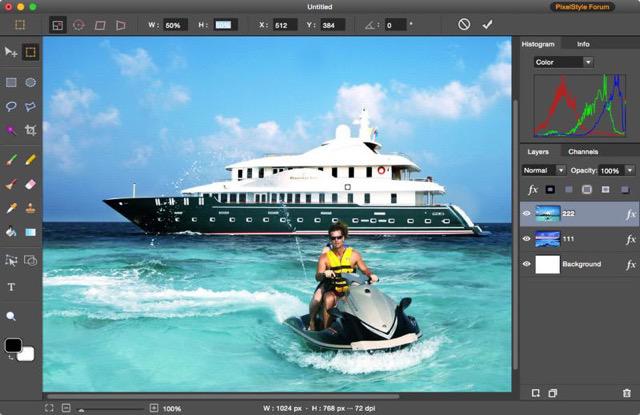
For a quick mark on one photo, a browser tab is the fastest route and there is no reason to install anything. Documentation is a different job: the same product shot gets annotated, corrected and re-exported for years, and redrawing every arrow each time is wasted work. PixelStyle keeps each callout as a shape on its own layer, above the photo, so moving one or changing its colour later never touches the pixels underneath.
- Arrows and boxes stay as editable shapes instead of being burned into the picture
- Every callout sits on its own layer, above the photo and below the label text
- AI Background Remover when a product should sit on clean white instead of a desk
- Opens and saves PSD, TIFF, JPG, PNG and WebP, so a layered file can be reopened next month
Requires macOS · 7-day free trial · or download on the Mac App Store
Arrow questions, answered plainly
Six things people ask after the first arrow comes out crooked.
How do I add an arrow to a photo without installing anything?
Open the free online editor, load the picture, open Annotate in the toolbar, choose the arrow, then drag from the tail to the head. Type a caption with the text tool if the arrow needs words, and press Save to download.
Can I put more than one arrow in the same image?
Yes, and there is no fixed limit. Draw the first arrow, then the second one on top of the same photo. Keep the count low enough that each arrow still points at something different.
Can I move or recolour an arrow after saving the file?
Not in the saved file. The export writes the arrow into the pixels, which is exactly why the image can be posted anywhere. Keep a copy of the clean photo until the layout is final, then redraw the one arrow that needs to change.
Does drawing an arrow change the image dimensions?
No. The arrow is painted over the existing pixels, so the exported file keeps the width and height of the original. If you need a smaller file, run Resize or export as WebP instead of JPEG.
Can I add an arrow to a PDF page?
The editor works on images, not PDF documents. Export or screenshot the page as a picture first, then draw on that. If the PDF itself has to be edited and re-saved, that is desktop software territory rather than a browser job.
Which format keeps a thin arrow sharp?
PNG. A two-pixel shaft and a clean arrowhead survive PNG compression exactly as drawn, while JPEG tends to soften them into a grey smear. Use JPEG only when the file has to be small and the arrow is thick enough to survive it.