home
download
buynow
faqs
contact
      How to burn Blu-ray folder to AVCHD for PS3 and Blu-ray Player?

E.M. Magic Swf2Avi

How to burn Blu-ray folder to AVCHD for PS3 and Blu-ray Player?

Step 1:

Find out the Blu-ray folder, "BDMV" and "CERTIFICATE".

Step 2:

Download and install ImgBurn, freeware.

Step 3:

Start ImgBurn, choose "Write files/folders to disc".
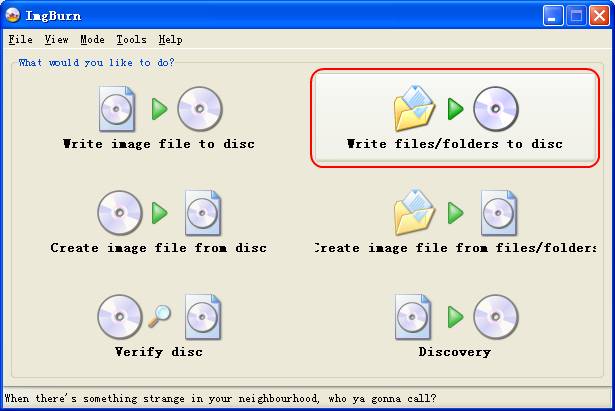
burn AVCHD

On the next window, click "Options", then set UDF revision to 2.50 (important).
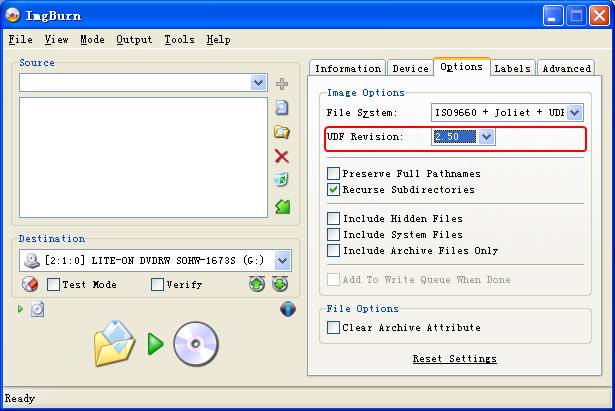
AVCHD

Step 4:

Drag and drop "BDMV" and "CERTIFICATE" folder to the source list, then click burn icon.
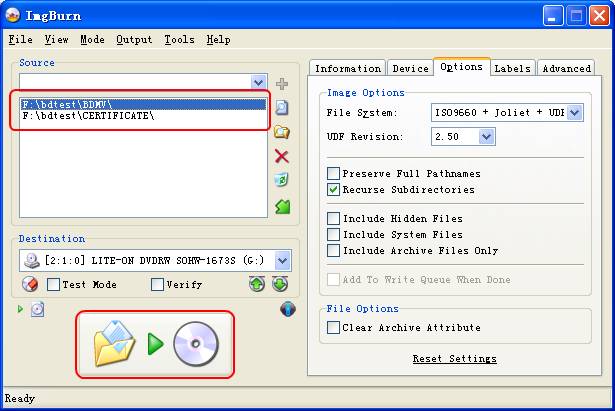
Blu-ray

Step 5:

When the burning process completed, push the burned disc into PS3 or Blu-ray player, and enjoy your movies.

E.M. Magic Swf2Avi, Free supports:

  • Free Email Support offered to try-persons and customers by: swordm@gmail.com
  • A quick way to get assistance to your questions within a user community: FORUM
       Tags

convert flash to avi total video converter flash to iPhone flash to AVCHD
swf to avi convertervideo to DVD swf to AVCHD
swf to 3gp
swf to iPhone
swf to iPod swf to gif

Awards

Relative link:

  Swf to Avi Converter
  Swf to 3gp Converter
  Swf to iPhone Converter
  Swf to AVCHD Converter
  Swf to DVD Converter
  YouTube Flash Video
  Download Tool

  Total Video Converter
  Total Video2DVD