How to Copy DVD
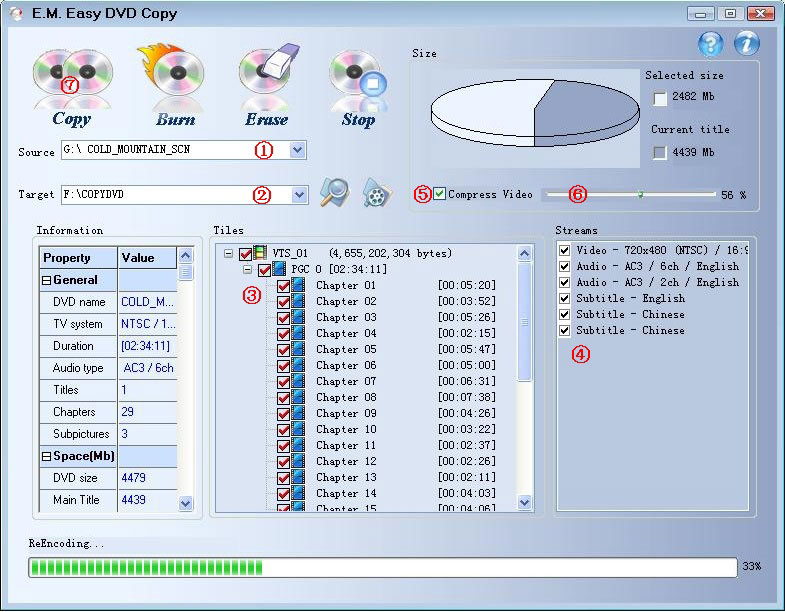
step 1:
If you have more than tow DVD devices and you have inserted more than one DVD
movie disc into the devices. You can select one of them as copy source at
"Source" list. Of course you can use default selection item.
step 2:
Select the copy target. you can select copy the DVD movie to disk folder(Program
will create a folder in the disk which has maximal free space, you can also
change the location where the DVD movies output will be copied with
 button.). button.).
step 3:
Select the title, PGC, or chapter. You can choose the title,PGC or chapter
tracks that you want to copy.
step 4:
If the DVD movie has some streams, all of them will be listed on the "Streams"
list box. So you can Select some streams that you want or interest. In default
case, all streams will be chosen.
step 5:
Sometimes if you haven't enough free space to copy, you can click
 check box let it
change to selected status, It means program will compress video while copying,
then do like step 6. In default case it not be selected. check box let it
change to selected status, It means program will compress video while copying,
then do like step 6. In default case it not be selected.
step 6:
If you set  the check
box on step 5, you can slide the spin the check
box on step 5, you can slide the spin
 to some position. the
position indicate the selected movie will be compressed to the special ratio. to some position. the
position indicate the selected movie will be compressed to the special ratio.
step 7:
When all are ready, Please click the button to start copying DVD to your
harddisk.
Free Download Video Converter |